> ## Documentation Index
> Fetch the complete documentation index at: https://moengage-user-guide.mintlify.site/llms.txt
> Use this file to discover all available pages before exploring further.
# Campaign Stats
# Campaign Stats
This dashboard provides a comprehensive view of all your campaigns across various channels in MoEngage. It allows you to overview campaign performance and track essential metrics. You can access aggregated data for an overall perspective as well as specific metrics related to individual campaigns.
To get started, this dashboard displays a set of KPIs that are essential for your campaigns.
 ## Overall Performance
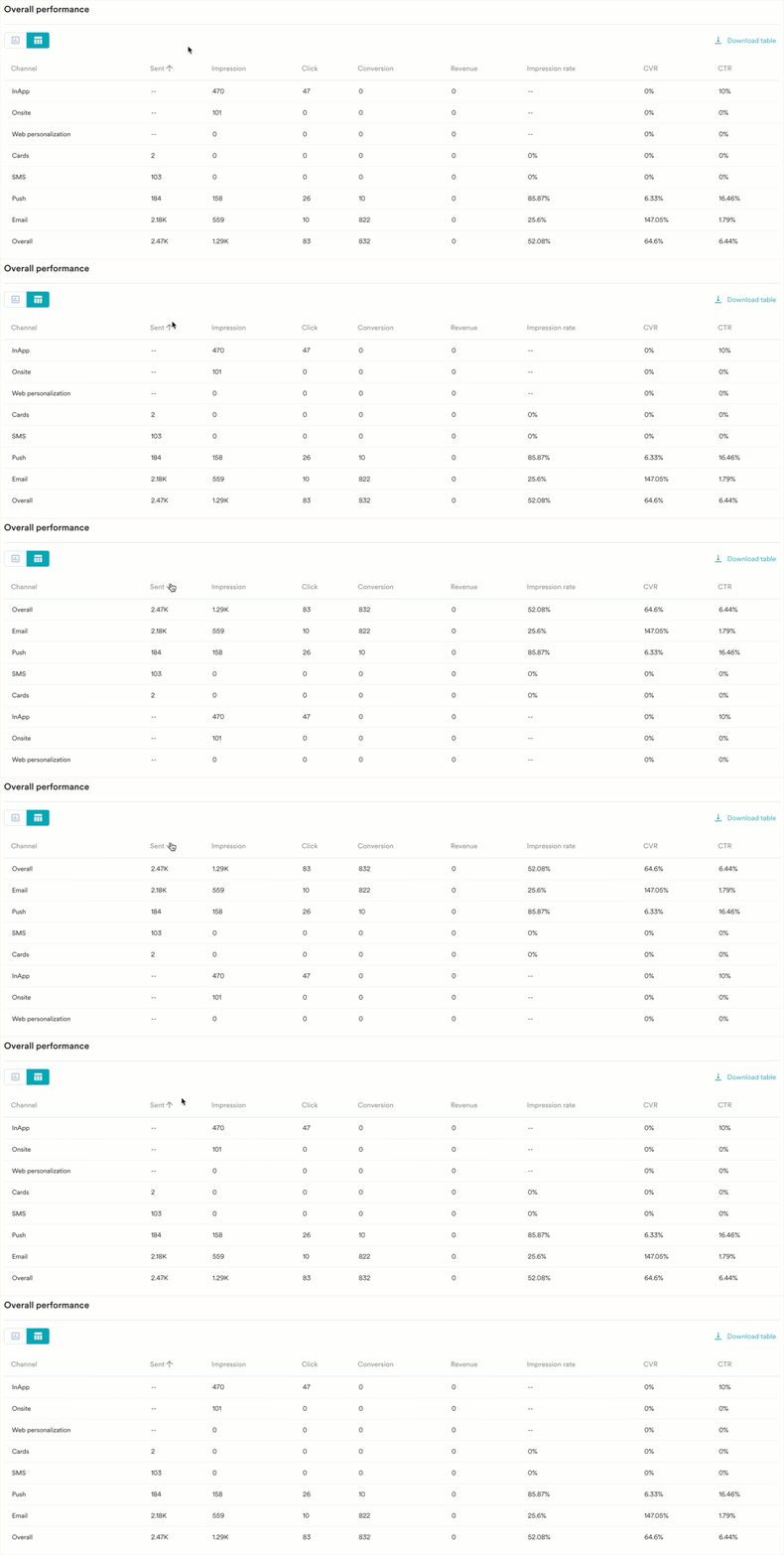
The **Overall performance** section displays data from all active channels combined into a single view. Here, you can compare different channels across various metrics. The data is available in both chart view and table view. The metrics presented may vary depending on the channel.
## Overall Performance
The **Overall performance** section displays data from all active channels combined into a single view. Here, you can compare different channels across various metrics. The data is available in both chart view and table view. The metrics presented may vary depending on the channel.
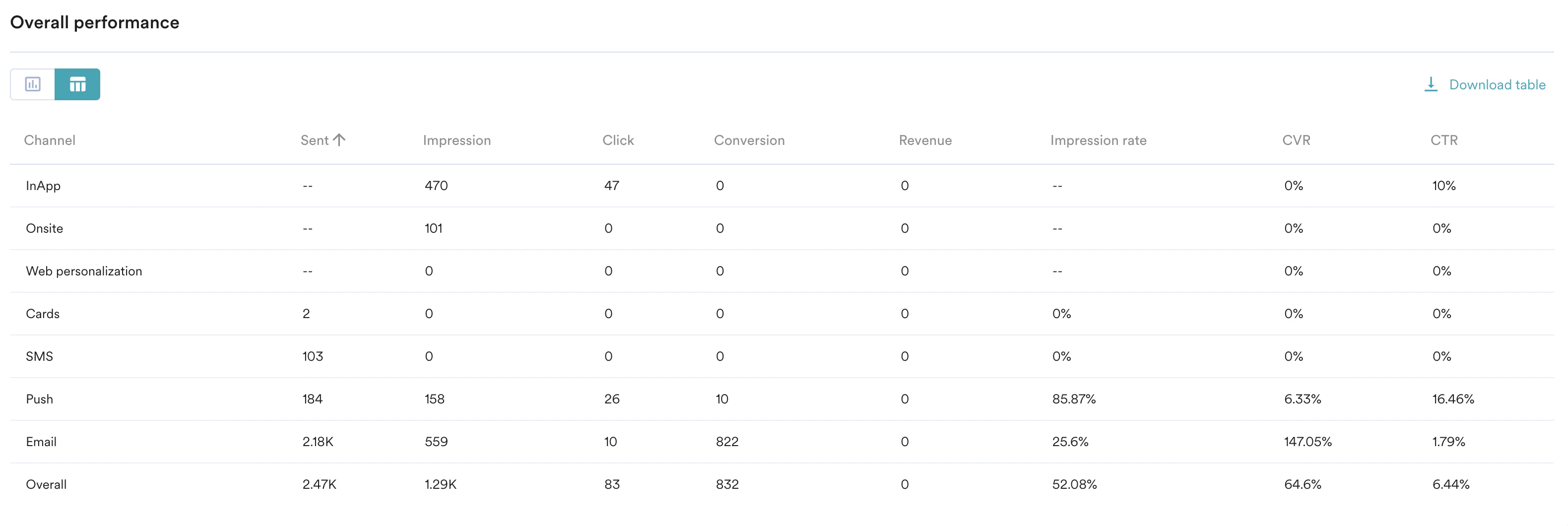 To see which metrics are available for each channel, refer to [Metric and channel types](/user-guide/analyze/dashboards/key-metrics).
## Channel Performance
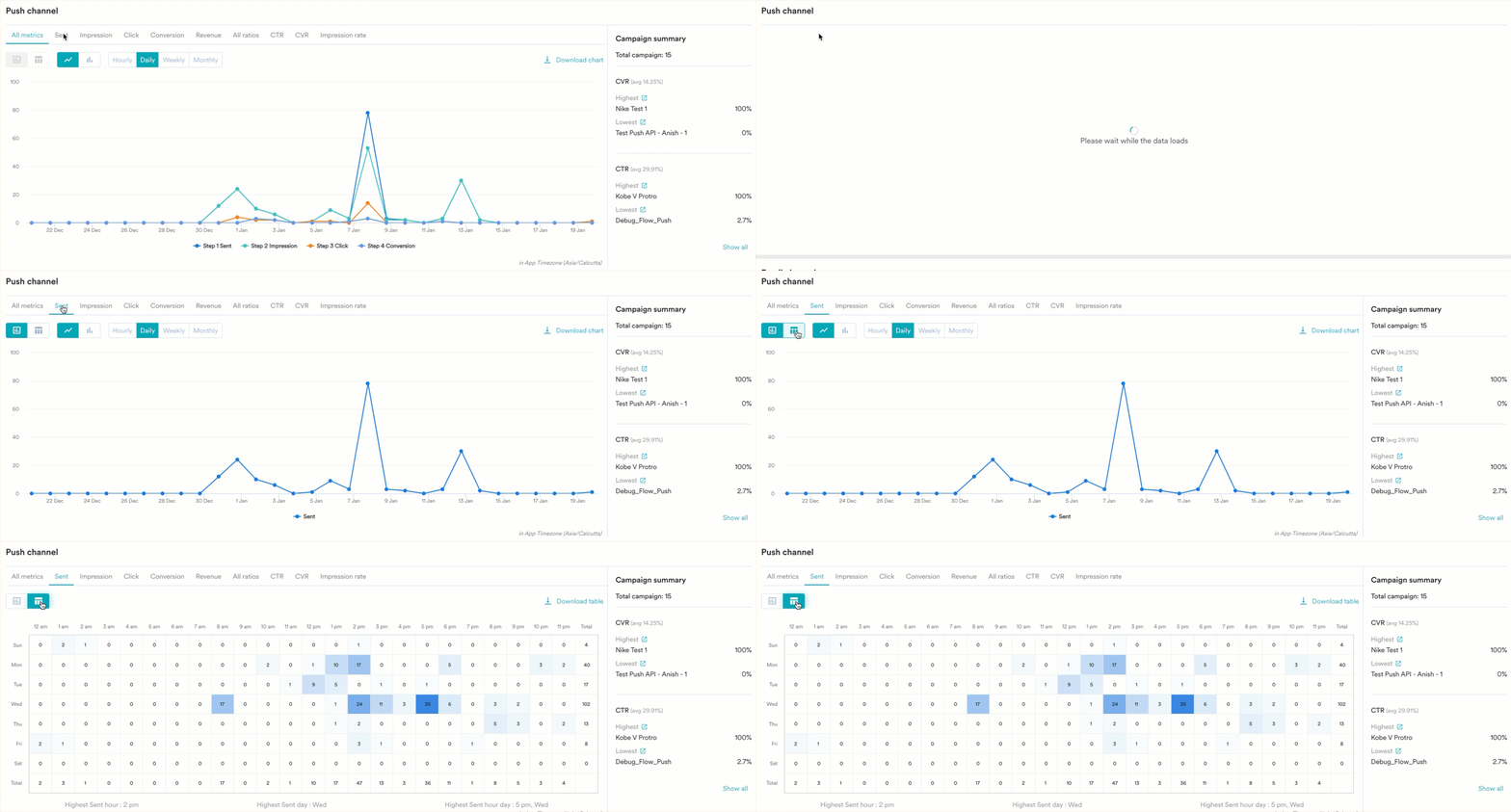
This section of the dashboard presents channel-specific analysis, allowing you to measure metrics relevant to each channel. The data is available in both chart and table formats.
Additionally, a **Campaign summary** card is on the right to enhance your visual analysis. This card provides a summary of the total number of campaigns within that channel, as well as the highest and lowest values for each associated metric.
To see which metrics are available for each channel, refer to [Metric and channel types](/user-guide/analyze/dashboards/key-metrics).
## Channel Performance
This section of the dashboard presents channel-specific analysis, allowing you to measure metrics relevant to each channel. The data is available in both chart and table formats.
Additionally, a **Campaign summary** card is on the right to enhance your visual analysis. This card provides a summary of the total number of campaigns within that channel, as well as the highest and lowest values for each associated metric.
 ### Metrics and Channel Types
Metrics shown for each channel are listed below:
| Channel | Metric |
| ------------------- | ----------------------------------------------------------------------------------------------------- |
| Push | Sent, Impression, Click, Conversion, Revenue, CTR, CVR, and Impression rate |
| Email | Sent, Delivered, Click, Conversion, Revenue, CTR, CVR, and Delivery rate |
| SMS | Sent, Delivered, Click, Conversion, Revenue, CTR, CVR, and Delivery rate |
| Cards | Sent, Impression, Delivered, Click, Conversion, Revenue, CTR, CVR, Impression rate, and Delivery rate |
| Flows | Total trips, Engaged trips, Converted trips, and CVR |
| In-App | Impression, Click, Conversion, Revenue, CTR, and CVR |
| On-Site | Impression, Click, Conversion, Revenue, CTR, and CVR |
| Connectors | Attempted, Sent, Conversion, Revenue, CVR, and Success rate |
| Web personalization | Impression, Click, Conversion, Revenue, CTR, and CVR |
| FB audience | Eligible, Attempted, Synced, Conversion, User attempted, and User synced |
To learn more about each metric, refer to the Analyze section in [Campaigns and Channels](/user-guide/campaigns-and-channels).
## Advanced
### Filters and Duration
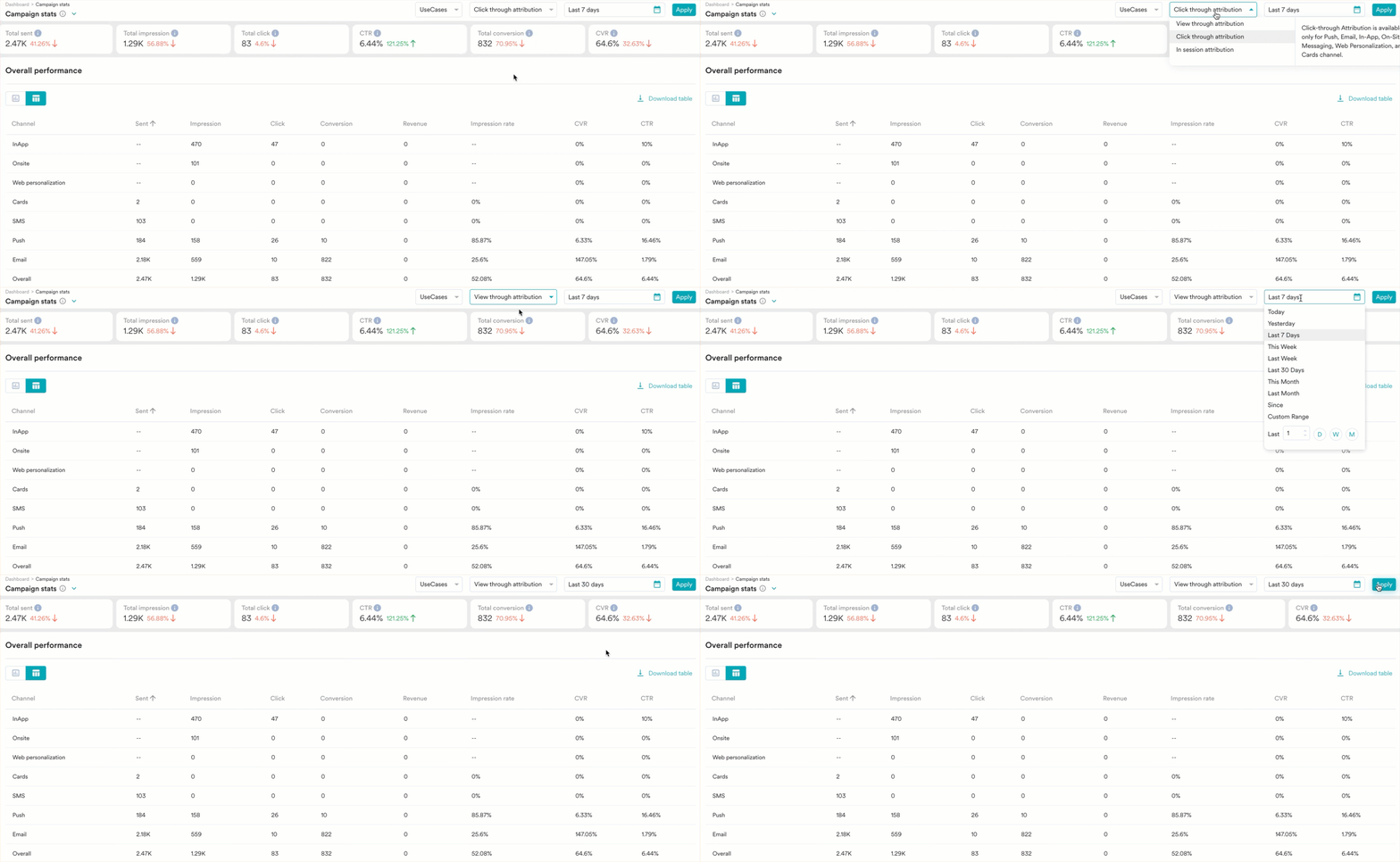
On the **Campaign stats** dashboard, you can filter the data based on the attribution type and set a date range. To use filters, follow the steps outlined below:
1. Select the attribution type from the list provided. To learn more about attribution types, refer to the Analyze section in Campaigns and Channels.
2. Set your desired date range and click **Apply**. This will update the dashboard according to your selected filters and display the relevant data.
### Metrics and Channel Types
Metrics shown for each channel are listed below:
| Channel | Metric |
| ------------------- | ----------------------------------------------------------------------------------------------------- |
| Push | Sent, Impression, Click, Conversion, Revenue, CTR, CVR, and Impression rate |
| Email | Sent, Delivered, Click, Conversion, Revenue, CTR, CVR, and Delivery rate |
| SMS | Sent, Delivered, Click, Conversion, Revenue, CTR, CVR, and Delivery rate |
| Cards | Sent, Impression, Delivered, Click, Conversion, Revenue, CTR, CVR, Impression rate, and Delivery rate |
| Flows | Total trips, Engaged trips, Converted trips, and CVR |
| In-App | Impression, Click, Conversion, Revenue, CTR, and CVR |
| On-Site | Impression, Click, Conversion, Revenue, CTR, and CVR |
| Connectors | Attempted, Sent, Conversion, Revenue, CVR, and Success rate |
| Web personalization | Impression, Click, Conversion, Revenue, CTR, and CVR |
| FB audience | Eligible, Attempted, Synced, Conversion, User attempted, and User synced |
To learn more about each metric, refer to the Analyze section in [Campaigns and Channels](/user-guide/campaigns-and-channels).
## Advanced
### Filters and Duration
On the **Campaign stats** dashboard, you can filter the data based on the attribution type and set a date range. To use filters, follow the steps outlined below:
1. Select the attribution type from the list provided. To learn more about attribution types, refer to the Analyze section in Campaigns and Channels.
2. Set your desired date range and click **Apply**. This will update the dashboard according to your selected filters and display the relevant data.
 ### Switch Views
In the **Overall performance** dashboard, you have the following options to visualize the dashboard:
* You can toggle between the chart and table views for a more detailed look at your data.
### Switch Views
In the **Overall performance** dashboard, you have the following options to visualize the dashboard:
* You can toggle between the chart and table views for a more detailed look at your data.
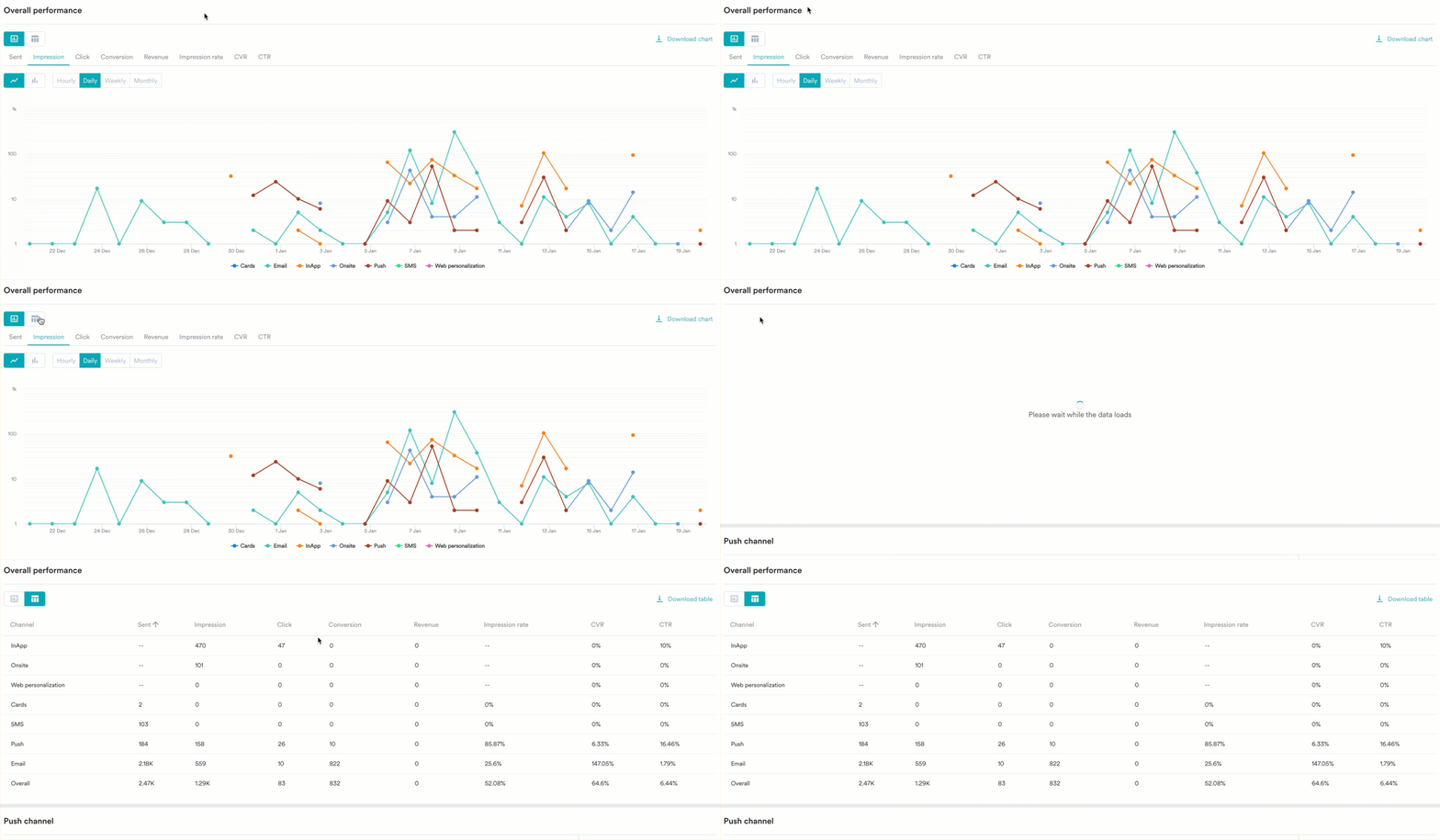 * In the table view, you can sort the table in ascending and descending order.
 * For each channel, you can visualize the data in a line chart or column chart.
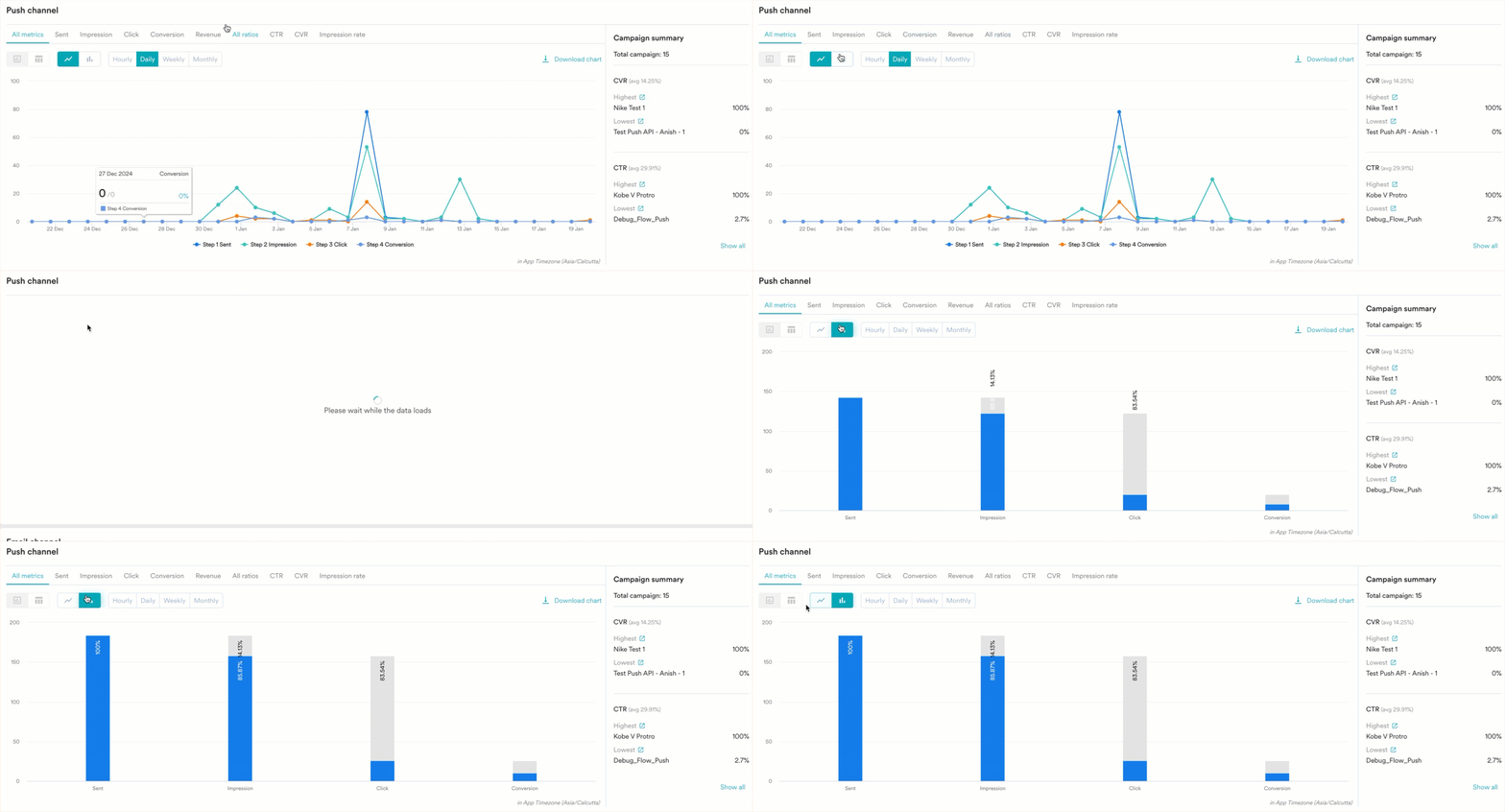 * These charts can be viewed with hourly, daily, weekly, and monthly granularity.
