> ## Documentation Index
> Fetch the complete documentation index at: https://moengage-user-guide.mintlify.site/llms.txt
> Use this file to discover all available pages before exploring further.
# How To Generate an Auth Token for the Data API?
This article explains how to generate an Auth Token for the Data API using the provided script.
## Instructions
1. **Input required**:
* **Workspace ID (earlier app id)**
* **API key**
To find the Workspace ID and API key, go to **Settings** > **APIs** in the MoEngage dashboard.
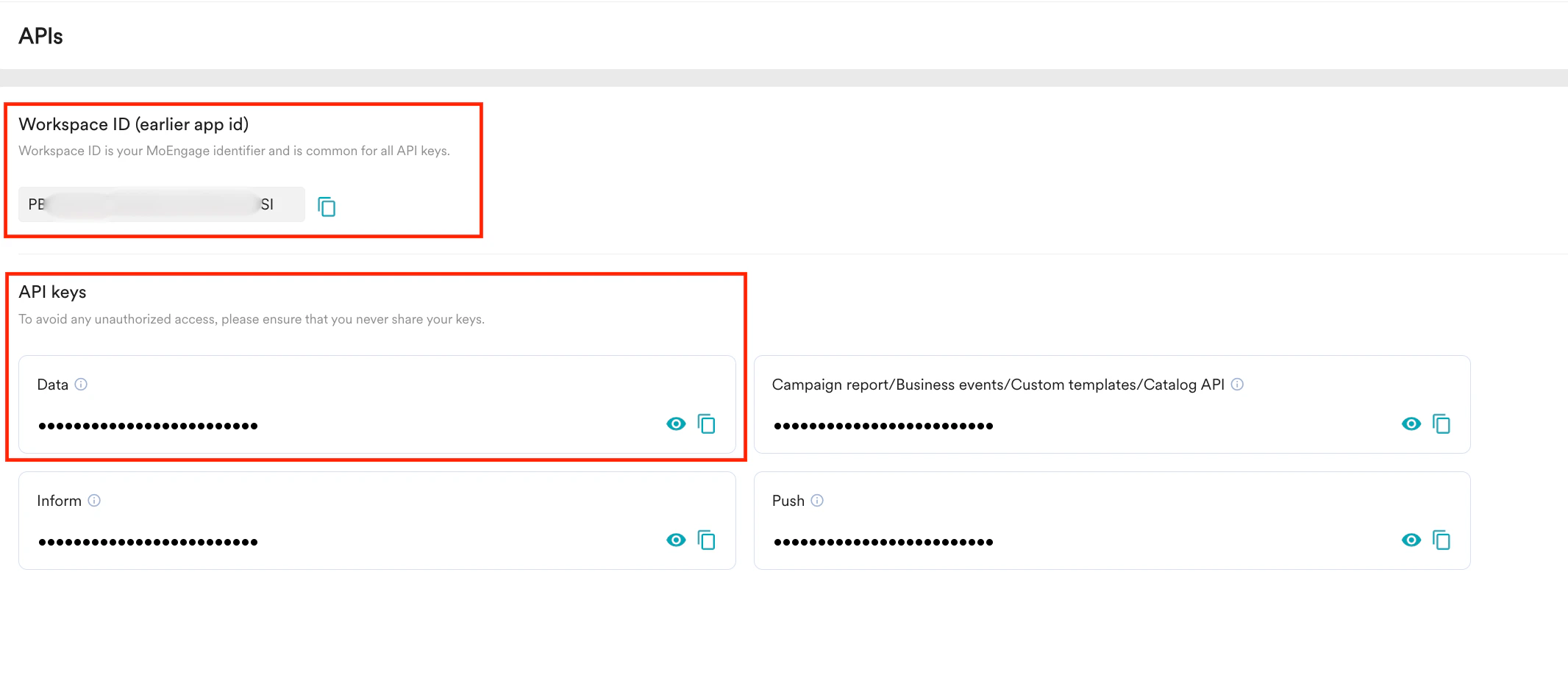 2. **Generate the Auth Token**:
Use the following script to generate the Auth Token for the specified app:
```python Python wrap theme={null}
import base64
import subprocess
app\_id = str(input("Enter the APP ID or Worskspace ID: ")).strip()
app\_key = str(input("Enter the secret key: ")).strip()
secret\_string = app\_id + ":" + app\_key
secret\_string\_bytes = secret\_string.encode("ascii")
base64\_bytes = base64.b64encode(secret\_string\_bytes)
base64\_string = base64\_bytes.decode("ascii")
subprocess.run("pbcopy", text=True, input=base64\_string)
print("Token copied to your clipboard")
```
Once executed, the Auth Token will be generated and automatically copied to the clipboard.
2. **Generate the Auth Token**:
Use the following script to generate the Auth Token for the specified app:
```python Python wrap theme={null}
import base64
import subprocess
app\_id = str(input("Enter the APP ID or Worskspace ID: ")).strip()
app\_key = str(input("Enter the secret key: ")).strip()
secret\_string = app\_id + ":" + app\_key
secret\_string\_bytes = secret\_string.encode("ascii")
base64\_bytes = base64.b64encode(secret\_string\_bytes)
base64\_string = base64\_bytes.decode("ascii")
subprocess.run("pbcopy", text=True, input=base64\_string)
print("Token copied to your clipboard")
```
Once executed, the Auth Token will be generated and automatically copied to the clipboard.