> ## Documentation Index
> Fetch the complete documentation index at: https://moengage-user-guide.mintlify.site/llms.txt
> Use this file to discover all available pages before exploring further.
# Set Up 2-Step Verification on Your Device
MoEngage allows you to secure your MoEngage account (workspace) with 2-step verification. To enable 2-step verification for your account, you must configure a one-time verification setup on your device using an authenticator app. After completing this one-time setup, the app on your device generates an authentication code. You can log in to your MoEngage account using the latest authentication code generated by your authenticator app.
**Prerequisites**
You must have an authenticator app downloaded on your phone or device. MoEngage supports 2-step verification through apps such as Google Authenticator, Twilio Authy, etc.
* You can download the Google Authenticator from the following links:
* [Google Play](https://play.google.com/store/apps/details?id=com.google.android.apps.authenticator2\&hl=en_IN\&gl=US)
* [App Store](https://apps.apple.com/us/app/google-authenticator/id388497605)
* You can download Twilio Authy from the following links:
* [Google Play](https://play.google.com/store/apps/details?id=com.authy.authy)
* [App Store](https://apps.apple.com/us/app/twilio-authy/id494168017)
# Scenarios for Setting up 2-Step Verification on Your Device
The following are the scenarios for enabling 2-step verification on your device:
* When your Admin [signs up for MoEngage](/user-guide/getting-started/initial-setup/sign-up-with-moengage-or-create-a-new-account-in-moengage) or creates a new workspace, MoEngage enables 2-step verification by default to protect the workspace from unauthorized access. When your admin tries to log in, MoEngage prompts them to set up 2-step verification on their device.
* Your Admin invites you to join a workspace with 2-step verification enabled at the workspace level. When you finish [setting up your account](/user-guide/getting-started/initial-setup/finish-your-account-setup-as-an-invited-user), MoEngage prompts you to set up 2-step verification on your device.
* Your Admin has not enabled 2-step verification at the workspace level, and you have logged in to your account. You enable 2-step verification for your account [in **My profile**](/user-guide/getting-started/initial-setup/manage-your-profile). You log out of your account or close the browser. During your next login, MoEngage prompts you to set up 2-step verification on your device.
* Your [Admin enables 2-step verification](/user-guide/settings/account/security/2-step-verification-or-two-factor-authentication-2fa) after you have logged in to your account, and you are automatically logged out. During your next login, MoEngage prompts you to set up 2-step verification on your device.
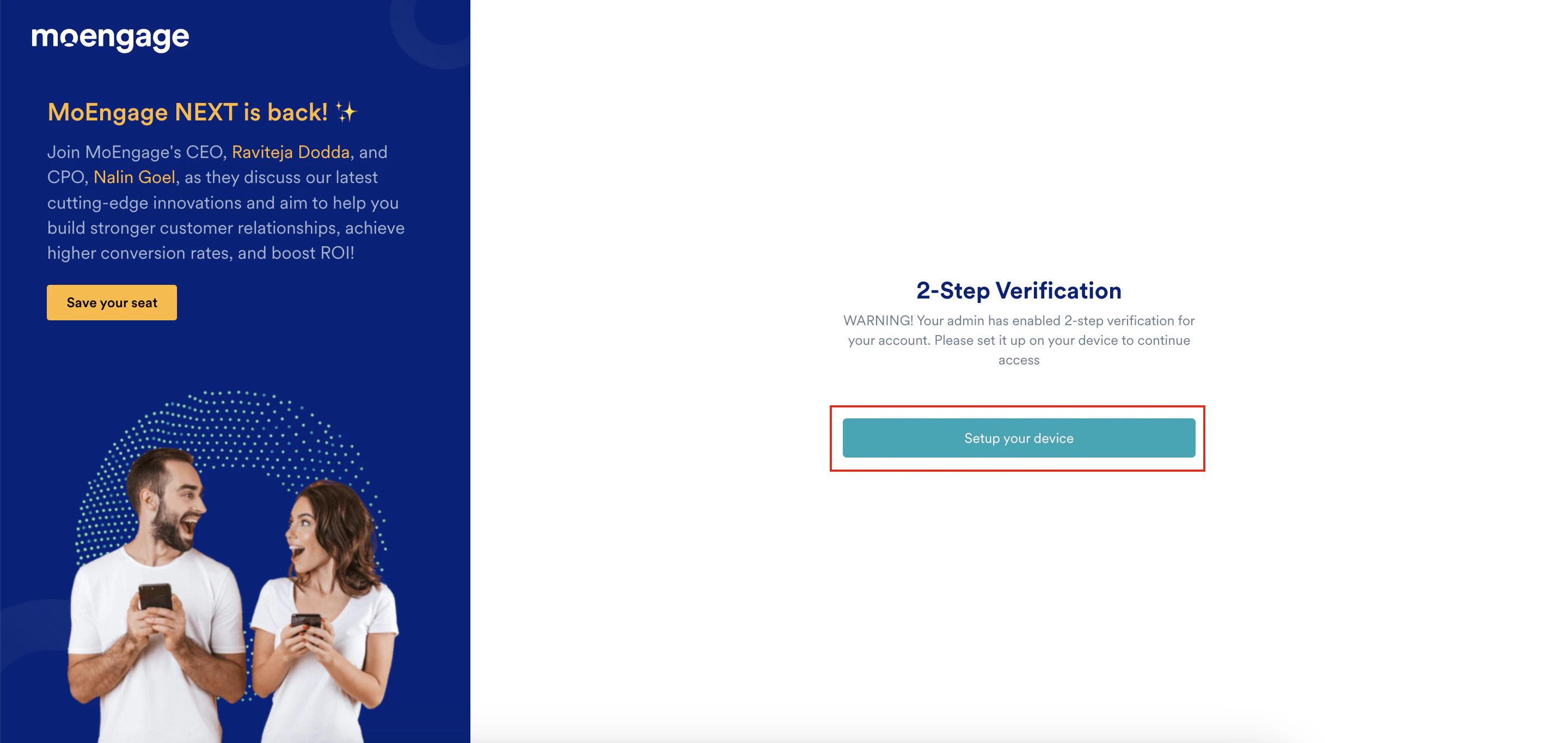
The scenarios above take you to the 2-Step Verification page:
 # Configure 2-Step Verification on Your Device
1. On the 2-Step Verification page, click **Setup your device**.
The Set your device authentication page appears.
# Configure 2-Step Verification on Your Device
1. On the 2-Step Verification page, click **Setup your device**.
The Set your device authentication page appears. 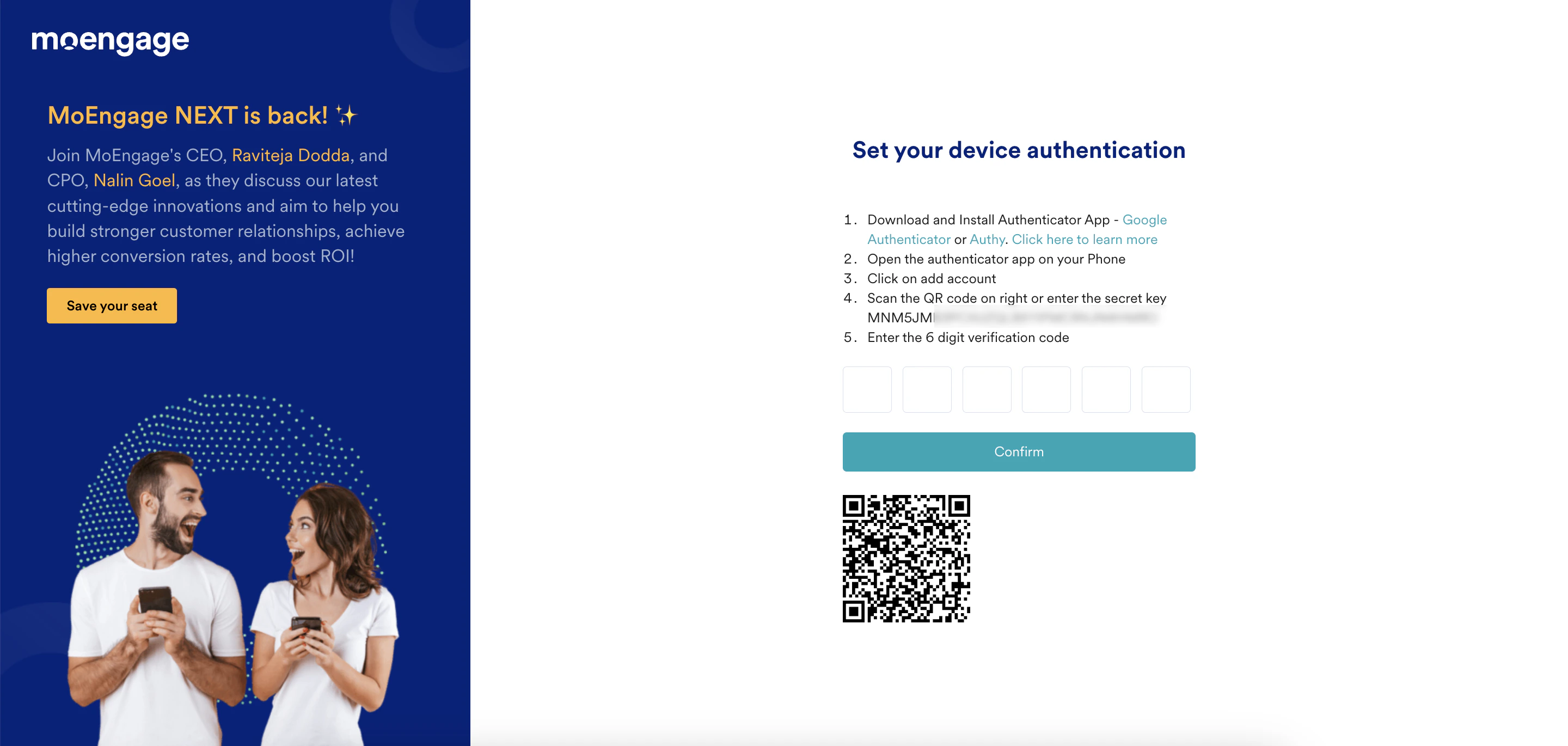 2. Open the authenticator app on your device now (for example, Google Authenticator) and tap the **+** icon.
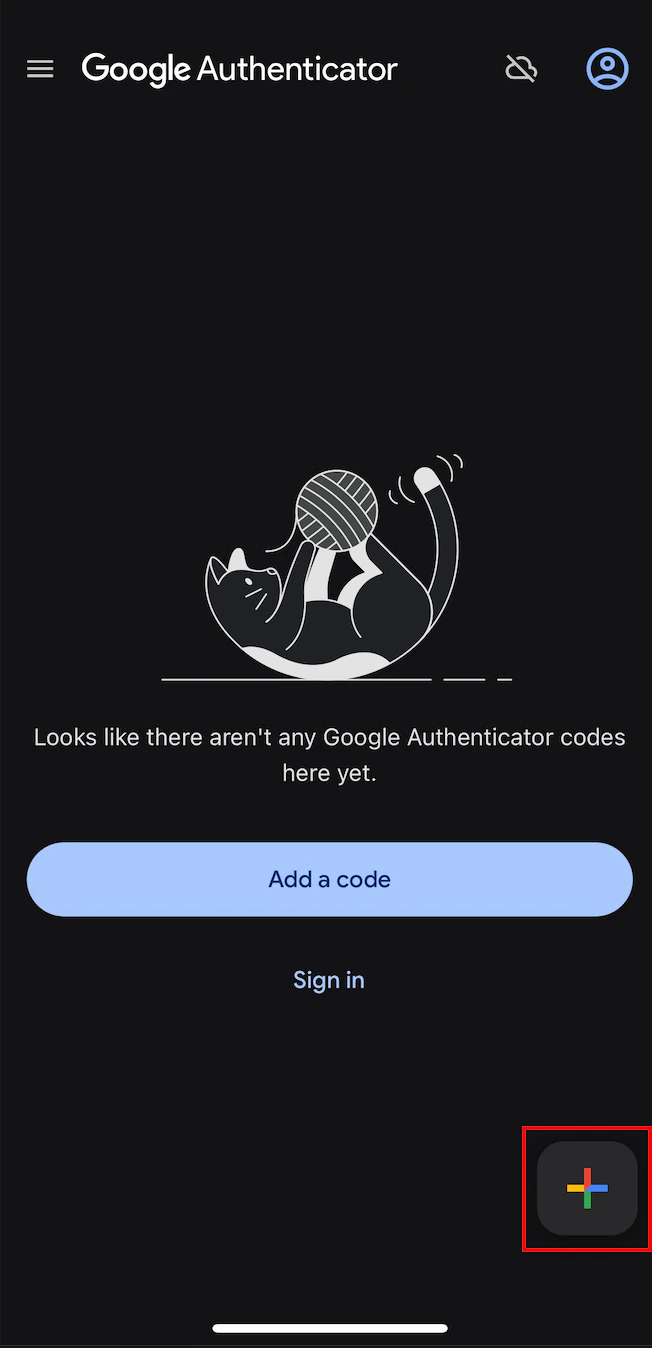 The Add an authentication code screen appears.
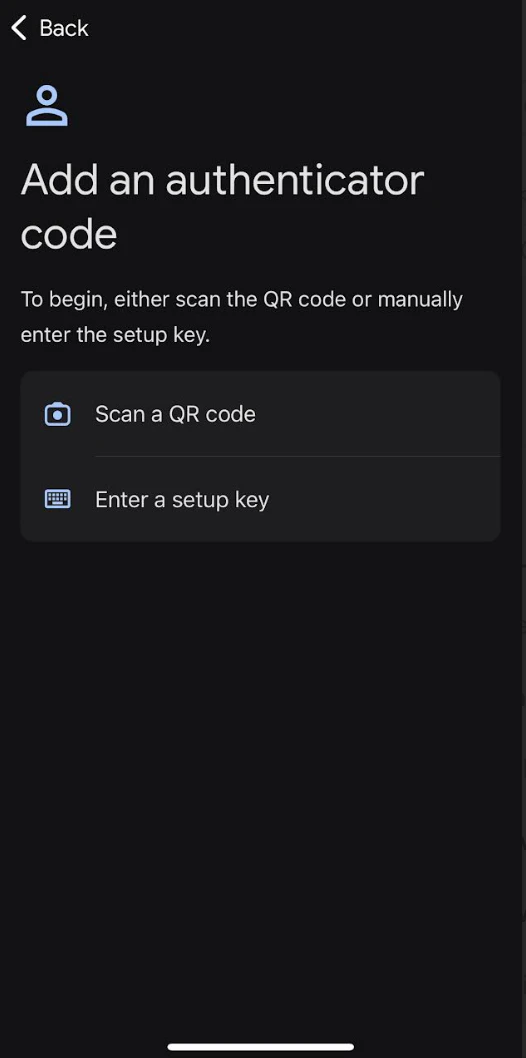 3. Use one of the following authentication options:
* **Using a QR code**
1. Tap **Scan a QR code**. The Scan code screen appears.
3. Use one of the following authentication options:
* **Using a QR code**
1. Tap **Scan a QR code**. The Scan code screen appears.
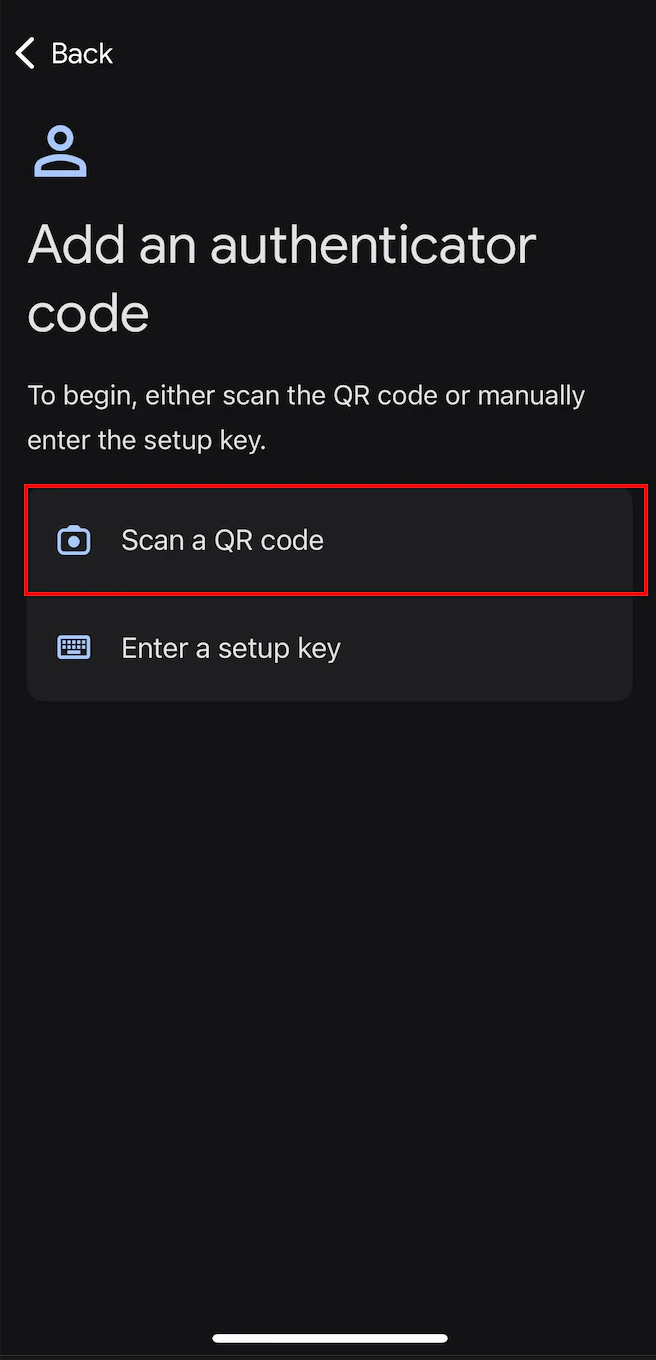 2. Scan the QR code on the **Set your device authentication** page in the MoEngage dashboard. An authentication is added to your device. Your authentication app generates a 6-digit code.
* **Using a setup key**
1. Tap **Enter a setup key**.
2. Scan the QR code on the **Set your device authentication** page in the MoEngage dashboard. An authentication is added to your device. Your authentication app generates a 6-digit code.
* **Using a setup key**
1. Tap **Enter a setup key**.
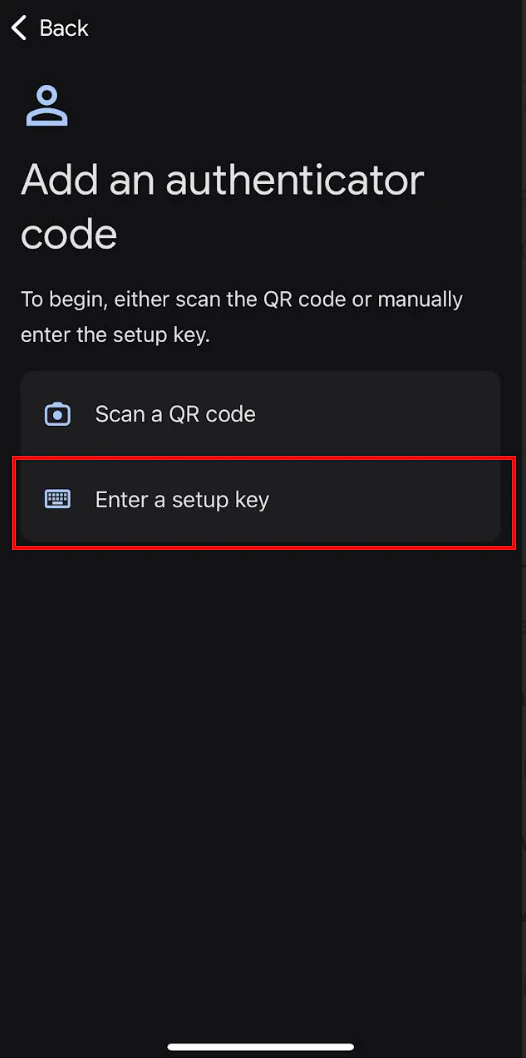 2. On the **Enter account details** screen, enter the following details:
| Fields | Required | Description |
| -------------------------------------------------------------------------------------------------------------------------------------------------------------------------------------------------------------------------------------------------------------------------------------------------------------------------------------------------------------------------------------------------------------------------------------------------------------------------------------------------------------------------------------------------------------------------------------------------------------------------------------------------------------------------------------------------------------------------------------------------------------------------------------------------------------------------------------------------------------------------------------------------------------------------------------------------------------------------------------------------------------------------------------------------------------------------------------------------------------------------------------------------------------------------------------------------------------------------------------------------------------------------------------------------------------------------------------------------------------------------------------------------------------------------------------------------------------- | -------- | ---------------------------------------------------------------------------------------------------------------------------------------------------------------------------------------------------------------------------------------------------------------------------------------------------------------------------------------------------------------------------------------------------------------------------------------------------------------------------------------------------------------------------------------------------------------------------------------------------------------------------------------------------------------------------------------------------------------------------------------------------------------------------------------------------------------------------------------------------------------------------------------------------------------------------------------------------------------------------------------------------------------------------------------------------------------------------------------------------------------------------------------------------------------------------------------------------------------------------------------------------------------------------------------------------------------------------------------------------------------------------------------------------------------------------------------------------------------------------------------------------------------------------------------------------------------------------------------- |
| Account name | Optional | Type your account name. |
| Your key | Yes | Type the 32-digit secret key displayed on the **Set your device authentication** page in the MoEngage dashboard.
2. On the **Enter account details** screen, enter the following details:
| Fields | Required | Description |
| -------------------------------------------------------------------------------------------------------------------------------------------------------------------------------------------------------------------------------------------------------------------------------------------------------------------------------------------------------------------------------------------------------------------------------------------------------------------------------------------------------------------------------------------------------------------------------------------------------------------------------------------------------------------------------------------------------------------------------------------------------------------------------------------------------------------------------------------------------------------------------------------------------------------------------------------------------------------------------------------------------------------------------------------------------------------------------------------------------------------------------------------------------------------------------------------------------------------------------------------------------------------------------------------------------------------------------------------------------------------------------------------------------------------------------------------------------------- | -------- | ---------------------------------------------------------------------------------------------------------------------------------------------------------------------------------------------------------------------------------------------------------------------------------------------------------------------------------------------------------------------------------------------------------------------------------------------------------------------------------------------------------------------------------------------------------------------------------------------------------------------------------------------------------------------------------------------------------------------------------------------------------------------------------------------------------------------------------------------------------------------------------------------------------------------------------------------------------------------------------------------------------------------------------------------------------------------------------------------------------------------------------------------------------------------------------------------------------------------------------------------------------------------------------------------------------------------------------------------------------------------------------------------------------------------------------------------------------------------------------------------------------------------------------------------------------------------------------------- |
| Account name | Optional | Type your account name. |
| Your key | Yes | Type the 32-digit secret key displayed on the **Set your device authentication** page in the MoEngage dashboard.
 kk |
| Type of key | Optional | This is the type of your key. Supported values are:
kk |
| Type of key | Optional | This is the type of your key. Supported values are:
- **Time based**: The OTP is generated based on the current time.
- **Counter based**: The OTP is generated based on an incrementing counter.
Select an option. In the following example, *Time based* is selected. |
| 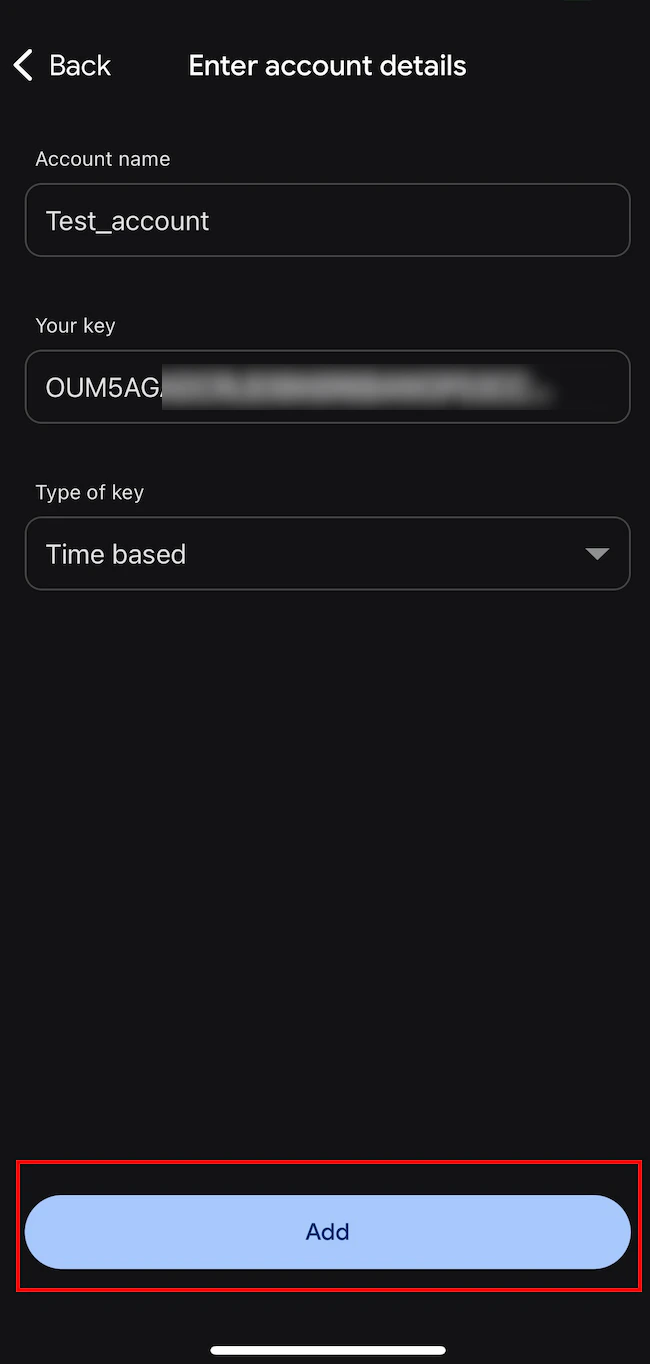 | | |
3. Tap **Add**.
4. An authentication is added to your device with the name you entered in the **Account name** box. Your authentication app generates a 6-digit code.
| | |
3. Tap **Add**.
4. An authentication is added to your device with the name you entered in the **Account name** box. Your authentication app generates a 6-digit code.
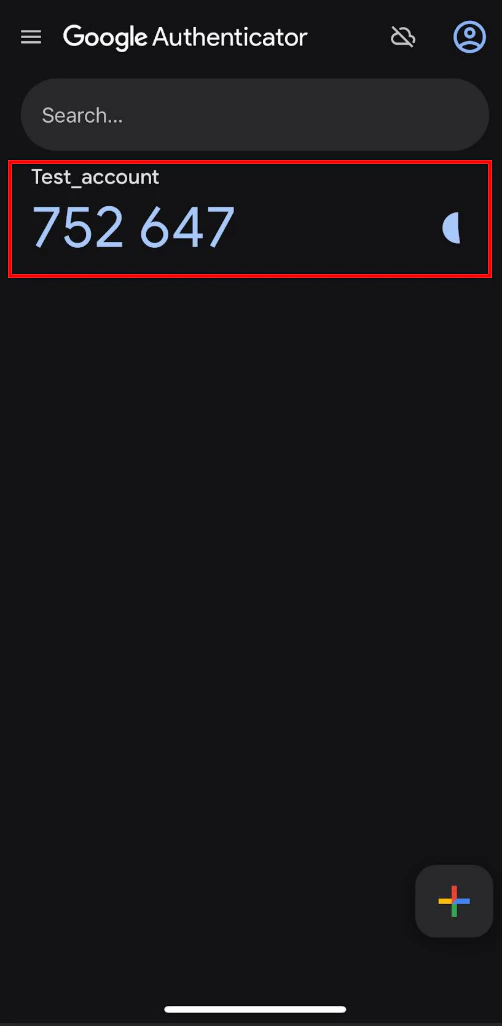 4. In the **Enter the 6 digit verification code** box, type the 6-digit authentication code generated by your authentication app.
Each authentication code your authentication app generates is valid only for 30 seconds. After that, your authentication app generates a new code.
4. In the **Enter the 6 digit verification code** box, type the 6-digit authentication code generated by your authentication app.
Each authentication code your authentication app generates is valid only for 30 seconds. After that, your authentication app generates a new code.
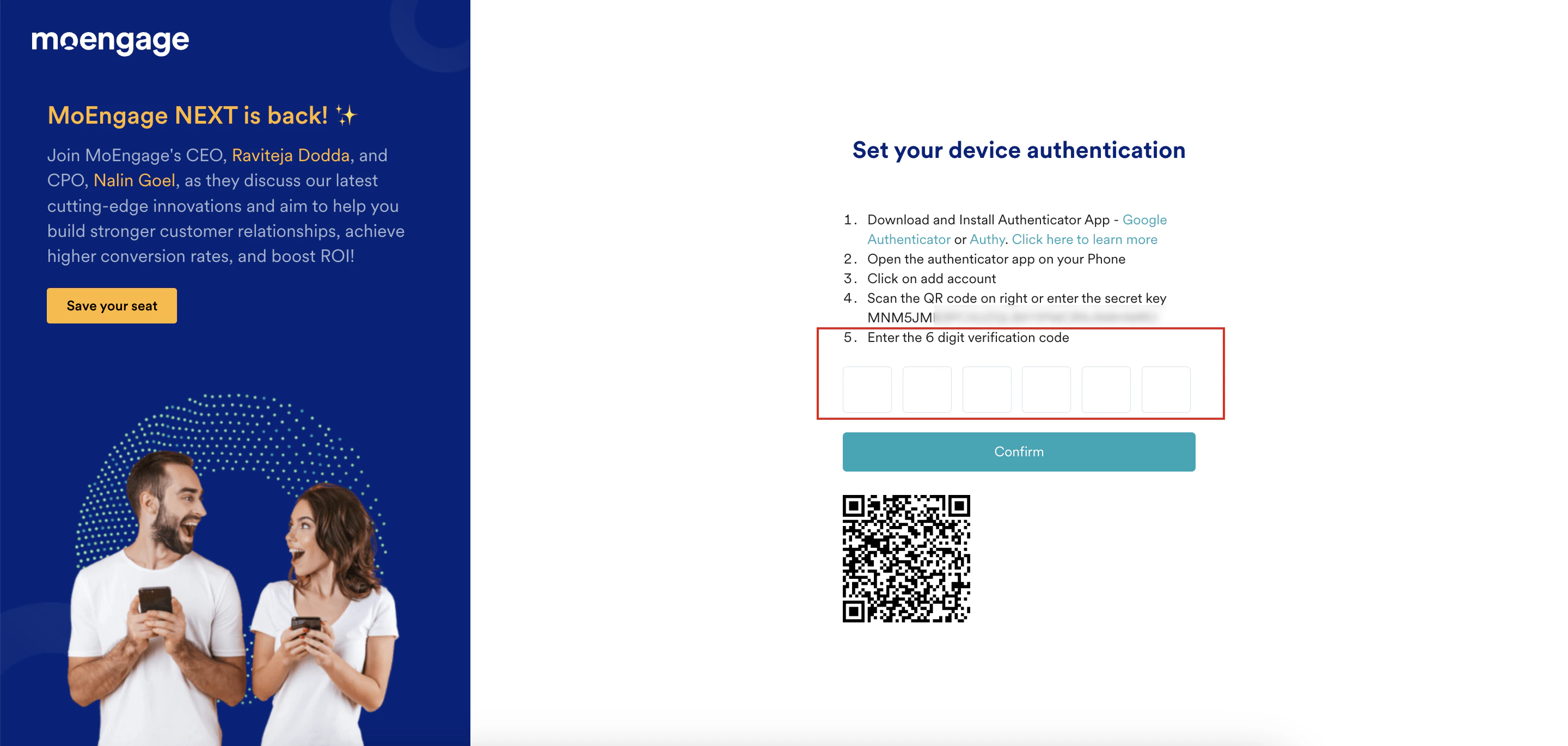 5. Click **Confirm**. You have successfully configured 2-step verification on your device for your MoEngage account.
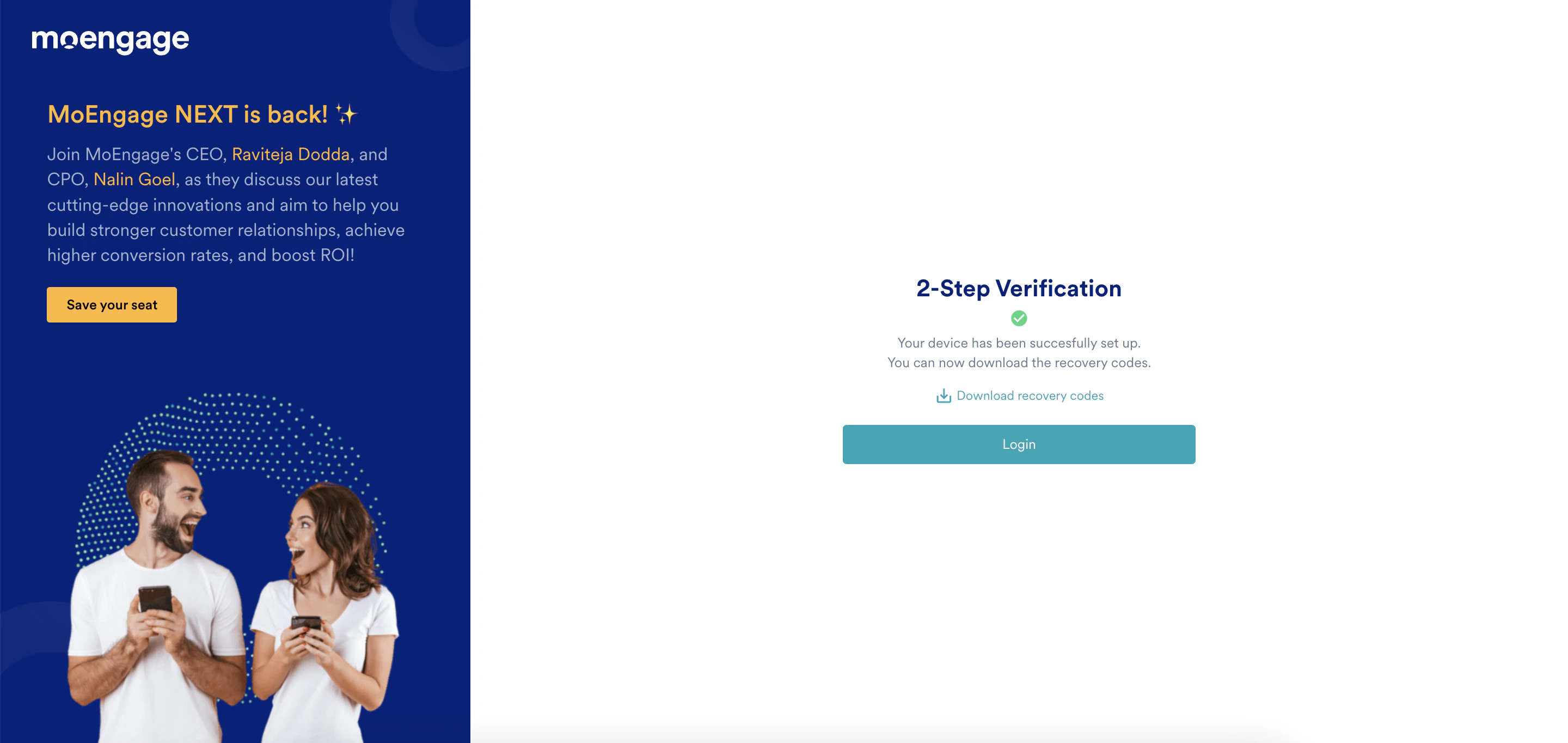 6. Click **Download recovery codes** to access your account without your device. The recovery codes will be downloaded in the CSV file.
You should store these codes securely and not share them with others. They serve as a backup or alternative method to verify your identity if you lose access to your primary 2-step verification device. For more information, refer to [Recovery Codes](/user-guide/getting-started/initial-setup/recovery-codes).
7. Click **Login**. The Login to your accounts page appears.
6. Click **Download recovery codes** to access your account without your device. The recovery codes will be downloaded in the CSV file.
You should store these codes securely and not share them with others. They serve as a backup or alternative method to verify your identity if you lose access to your primary 2-step verification device. For more information, refer to [Recovery Codes](/user-guide/getting-started/initial-setup/recovery-codes).
7. Click **Login**. The Login to your accounts page appears.
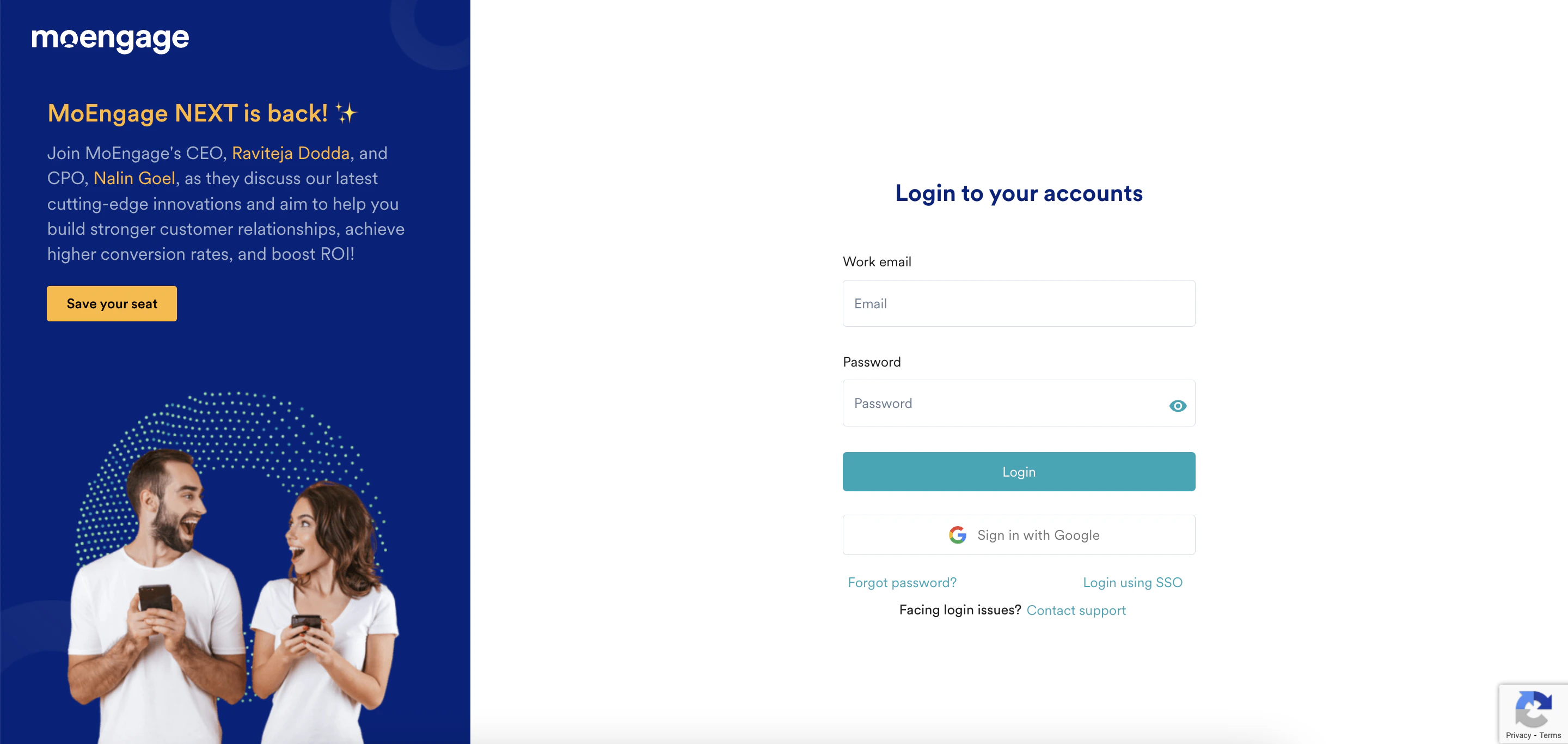 8. You can log in to your account now. For more information, refer to [Log in to MoEngage](/user-guide/getting-started/initial-setup/log-in-to-moengage).
# Troubleshoot Issues with 2-Step Verification
If you are facing challenges with 2-step verification, perform the following steps:
* The 2-step verification code is only valid for 30 seconds, so make sure that the device you are using to access MoEngage and the device where the authenticator is installed both have the same timezone.
* Clear the browser’s cookies and cache.
* Each MoEngage customer is hosted in a separate data center. When logging in, make sure you use the correct URL for your workspace. You can find the correct login URL by referring to the mapping of the workspace [here](/user-guide/data/key-concepts/data-centers-in-moengage) and the API endpoints.
* If you do not receive the email to reset your authenticator device, ensure that your administrative team has not blocked the MoEngage domain.
If you still face challenges after performing the above steps, contact the MoEngage Support team.
For further assistance, please contact your MoEngage Customer Success Manager (CSM) or the Support team.
8. You can log in to your account now. For more information, refer to [Log in to MoEngage](/user-guide/getting-started/initial-setup/log-in-to-moengage).
# Troubleshoot Issues with 2-Step Verification
If you are facing challenges with 2-step verification, perform the following steps:
* The 2-step verification code is only valid for 30 seconds, so make sure that the device you are using to access MoEngage and the device where the authenticator is installed both have the same timezone.
* Clear the browser’s cookies and cache.
* Each MoEngage customer is hosted in a separate data center. When logging in, make sure you use the correct URL for your workspace. You can find the correct login URL by referring to the mapping of the workspace [here](/user-guide/data/key-concepts/data-centers-in-moengage) and the API endpoints.
* If you do not receive the email to reset your authenticator device, ensure that your administrative team has not blocked the MoEngage domain.
If you still face challenges after performing the above steps, contact the MoEngage Support team.
For further assistance, please contact your MoEngage Customer Success Manager (CSM) or the Support team.