

Problem
Alert statistics (Inform) are not displayed, even though SMS messages are successfully sent to users.Solution
To ensure that you receive statistics, include the user ID in the request.How can we segment the number of messages sent through Inform?
How can we segment the number of messages sent through Inform?
You can track the messages sent through Inform by filtering your campaign events for the Alert ID attribute. To create this segment:
- Navigate to your MoEngage dashboard and click Create segment.
- Select User behavior and choose the relevant channel event (e.g.,
Email Sent,SMS Sent,Notification Sent iOS, Notification Sent Android, orWhatsApp Message Sent). - Define your timeframe (e.g., “in the last 3 days”).
- Add a filter for the attribute Alert ID.
- Set the operator to exists. (Example: This will return all users who were sent any Inform message during your specified timeframe, regardless of which specific alert triggered the message).
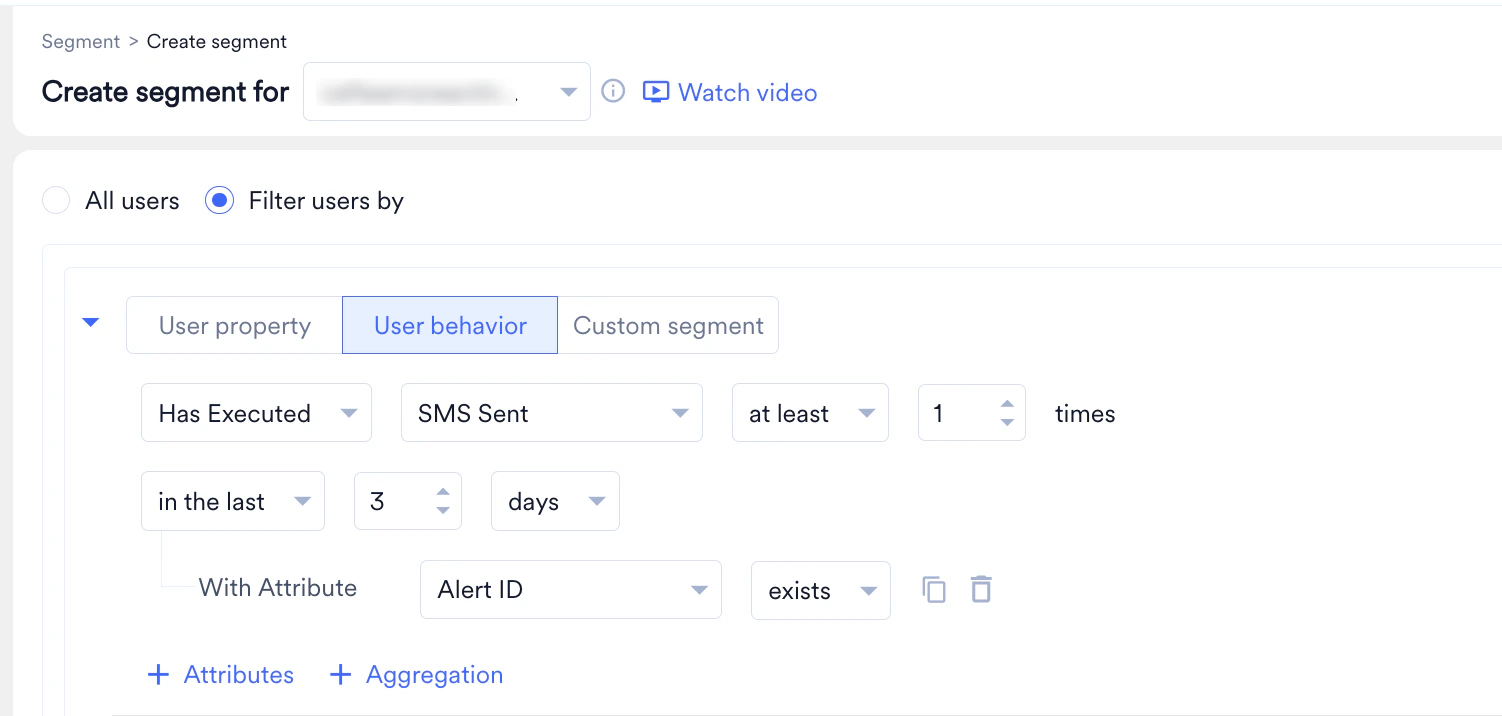
If you want to track the reach of one specific alert rather than all of them, follow the exact steps above, but change the operator from exists to is, and select your specific Alert ID into the value field (e.g., Alert ID is 69c63d7218dfa5e41e2f1c73).
How can I view the overall number of messages sent via MoEngage Inform?
How can I view the overall number of messages sent via MoEngage Inform?
You can view comprehensive delivery and usage statistics in the MoEngage Dashboard. Navigate to Settings > Billing > Usage to see the volume of total Inform messages sent across all channels through Inform. For more information, refer to Usage Details