To be compliant with DLT regulations, you will have to make a few changes to make in your SMS settings. This will ensure no interruptions in your current/future SMS campaigns. For more information, refer to the SMS DLT regulations and registration process.Documentation Index
Fetch the complete documentation index at: https://moengage-user-guide.mintlify.app/llms.txt
Use this file to discover all available pages before exploring further.
- Since DLT regulations are applicable only in India, these changes are applicable only if you are sending SMS to Indian mobile numbers.
- The regulatory process requires scrubbing the Entity IDs, Sender IDs, and Template IDs with all the operators.
- Ensure that all the content templates are uploaded to the operator DLT portal.
Update DLT-specific details with your SMS provider
As per the DLT platform scrubbing requirements, operators will accept and deliver messages only if they receive the following information in every message submission:- Principal Entity ID
- Sender ID
- Template ID
- Gupshup
- Kaleyra (Solution Infini)
- Login to the Gupshup portal using your Account login details and OTP.
- Go to the DLT Template module. There are two tabs: Single Template and Upload Template List.
- In the Single Template section, list the following and click SUBMIT.
- Template Name
- Template Id (URN)
- Transactional (yes/no)
- DLT Message Type
- Message Type
- Business Category
- Mask
- Template content.
- In the Upload template list section, list the same details as above. This is a bulk upload option where you can upload many templates simultaneously.
- Make sure you have done the above steps for both promotional and transactional SMS.
- If you are sending SMS using Custom Connectors, contact your SMS providers to understand how the DLT fields - Entity ID, Sender ID, and Template IDs need to be passed to them.
Update settings on the MoEngage Dashboard
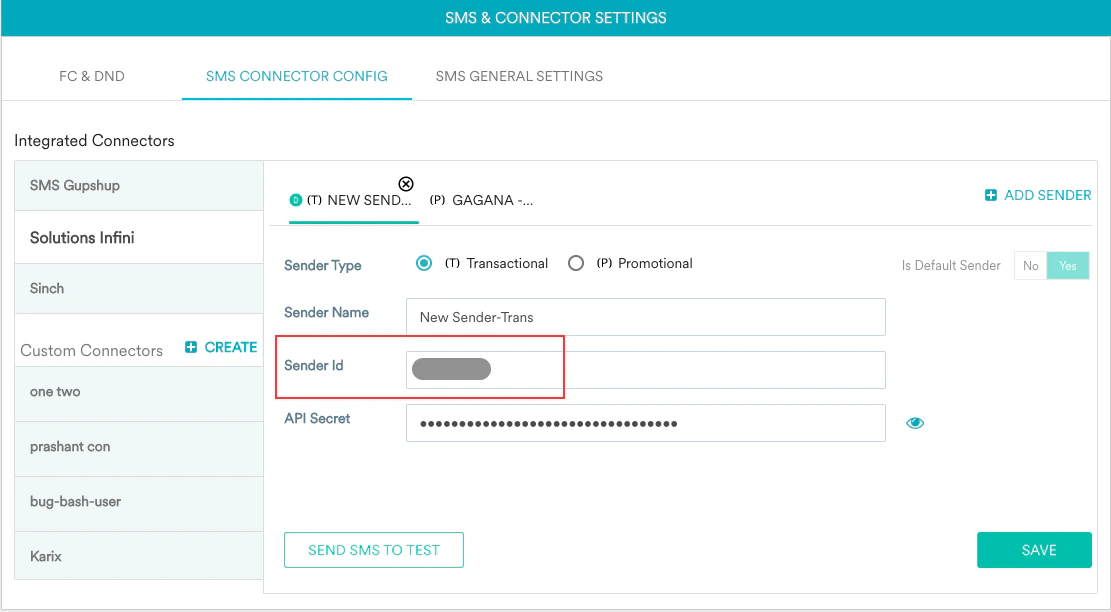
If you use SMS Gupshup or Kaleyra as integrated providers, update the Sender IDs in the MoEngage Dashboard. Enter the Header ID registered and approved on the DLT platform in the Sender ID field for all the senders - for both transactional and promotional SMS. This will ensure that your SMS campaigns are not impacted.