Documentation Index
Fetch the complete documentation index at: https://moengage-user-guide.mintlify.app/llms.txt
Use this file to discover all available pages before exploring further.
Problem
Common issues with Push notifications, including failed delivery, screen navigation, deep linking, and rich landing, are occurring on iOS devices using Native iOS, Objective-C, and MoEngage-iOS-SDK (Versions 7.x.x, 8.x.x, 9.x.x).
Solution
Perform the following steps:
- Disable Firebase Proxy:
- If you are not using Firebase push notifications, disable the Firebase proxy by adding the FirebaseAppDelegateProxyEnabled key in info.plist with the value Boolean = False/NO.
- Test the push notification. If it works, no further action is needed.
- If you are using Firebase push notifications, skip this step and proceed with the following steps.
- Set UNUserNotificationCenterDelegate:
- In AppDelegate.m, set UNUserNotificationCenterDelegate in the didFinishLaunch method.
- If you are initializing Firebase in didFinishLaunch, do so before initializing the MoEngage SDK.
- Ensure UNUserNotificationCenterDelegate is set at the start of this method.
//7.xx
#import
//8.xx
#import
//9.xx
@import MoEngageSDK;
@implementation AppDelegate

 - (BOOL)application:(UIApplication *)application didFinishLaunchingWithOptions:(NSDictionary *)launchOptions
{
  UNUserNotificationCenter *center = [UNUserNotificationCenter currentNotificationCenter];
  center.delegate = self;

  [FIRApp configure]; //Firebase configuration syntx could differ according to versions

  //MoEngage Initializatoin - use specific version code only

  //7.xx version with sdkConfig
  MOSDKConfig* sdkConfig = [[MOSDKConfig alloc] initWithAppID: @"XXXXXXXXXXXXXXXX"];
  sdkConfig.moeDataCenter = DATA_CENTER_0X;
  sdkConfig.appGroupID = @"group.com.XXXXXXXXXXXXXXXX";
  #ifdef DEBUG
    [[MoEngage sharedInstance] initializeTestWithConfig:sdkConfig andLaunchOptions:launchOptions];
  #else
    [[MoEngage sharedInstance] initializeLiveWithConfig:sdkConfig andLaunchOptions:launchOptions];
  #endif

  //8.xx version with sdkConfig
  MOSDKConfig* sdkConfig = [[MOSDKConfig alloc] initWithAppID:@"XXXXXXXXXXXXXXXX"];
  sdkConfig.enableLogs = true;
  sdkConfig.moeDataCenter = MODataCenterData_center_0X;
  sdkConfig.appGroupID = @"group.com.XXXXXXXXXXXXXXXX";
  #ifdef DEBUG
    [[MoEngage sharedInstance] initializeDefaultTestInstanceWithConfig:sdkConfig andLaunchOptions:nil];
  #else
    [[MoEngage sharedInstance] initializeDefaultLiveInstanceWithConfig:sdkConfig andLaunchOptions:nil];
  #endif

  //9.xx version with sdkConfig
  MoEngageSDKConfig* sdkConfig = [[MoEngageSDKConfig alloc] initWithAppId:@"XXXXXXXXXXXXXXXX" dataCenter: MoEngageDataCenterData_center_0X];
  MoEngageConsoleLogConfig *logConfig = [[MoEngageConsoleLogConfig alloc] initWithIsLoggingEnabled:YES loglevel:MoEngageLoggerTypeVerbose];
  sdkConfig.consoleLogConfig = logConfig;
  sdkConfig.appGroupID = @"group.com.XXXXXXXXXXXXXXXX";
  #ifdef DEBUG
    [[MoEngage sharedInstance] initializeDefaultTestInstance:sdkConfig];
  #else
    [[MoEngage sharedInstance] initializeDefaultLiveInstance:sdkConfig];
  #endif

  // Rest of the implementation related to developer's app

  return YES;
}
- Extend AppDelegate.h:
- Extend AppDelegate.h to conform to UNUserNotificationCenterDelegate. Your AppDelegate.h must resemble the following code snippets:
#import
@interface AppDelegate : UIResponder <uiapplicationdelegate, unusernotificationcenterdelegate="UNUserNotificationCenterDelegate"></uiapplicationdelegate,>
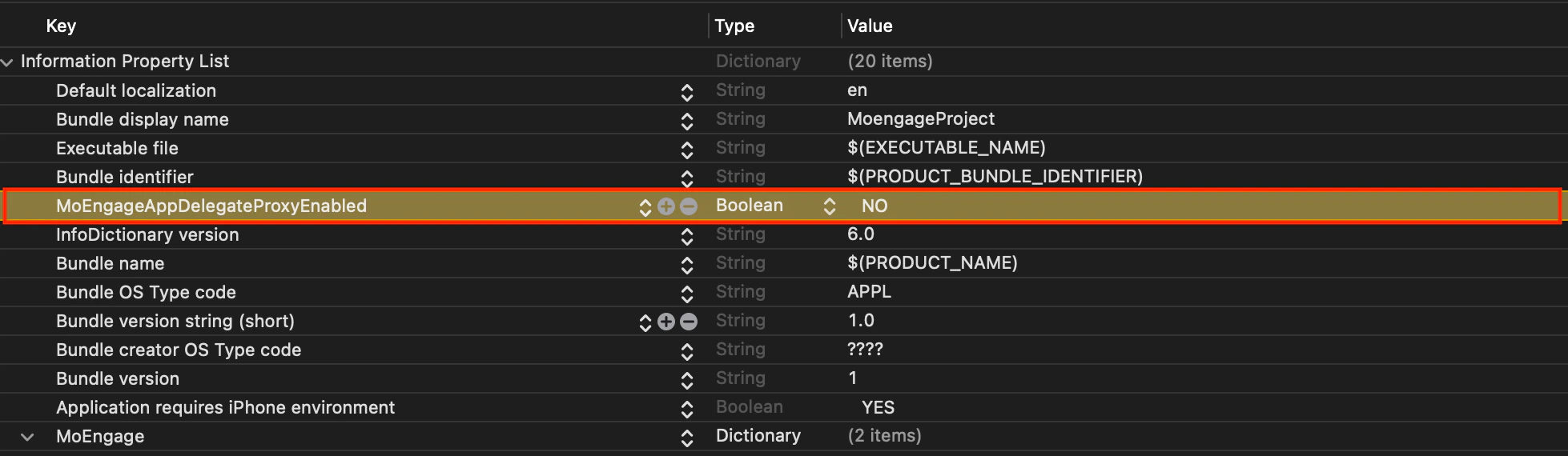
- Disable MoEngage Proxy:
- Add MoEngageAppDelegateProxyEnabled key in info.plist with the value Boolean = False/NO
- Pass Push Notification Token Manually:
- Use the didRegisterForRemoteNotificationsWithDeviceToken function of AppDelegate.m to pass the push notification token manually.
- (void)application:(UIApplication *)application didRegisterForRemoteNotificationsWithDeviceToken:(NSData *)deviceToken
{
  //7.xx version
  [[MoEngage sharedInstance] setPushToken:deviceToken];

  //8.xx version
  [[MOMessaging sharedInstance] setPushToken:deviceToken];

  //9.xx version
  [[MoEngageSDKMessaging sharedInstance] setPushToken:deviceToken];
}
- Implement UNUserNotificatoinCenter Delegate Functions:
- Ensure UNUserNotificatoinCenter Delegate functions are implemented in AppDelegate.m.
-(void)userNotificationCenter:(UNUserNotificationCenter *)center willPresentNotification:(UNNotification *)notification withCompletionHandler:(void (^)(UNNotificationPresentationOptions options))completionHandler
{
  if (@available(iOS 14.0, *)) {
    completionHandler(UNNotificationPresentationOptionBadge | UNNotificationPresentationOptionSound | UNNotificationPresentationOptionList | UNNotificationPresentationOptionBanner);
  } else {
    // Fallback on earlier versions
    completionHandler(UNAuthorizationOptionSound | UNAuthorizationOptionAlert | UNAuthorizationOptionBadge);
  }
}
- (void)userNotificationCenter:(UNUserNotificationCenter *)center didReceiveNotificationResponse:(UNNotificationResponse *)response withCompletionHandler:(void (^)(void))completionHandler
{
  //7.xx version
  [[MoEngage sharedInstance] userNotificationCenter:center didReceiveNotificationResponse:response];
  //8.xx version
  [[MOMessaging sharedInstance] userNotificationCenter:center didReceive:response];

  //9.xx version
  [[MoEngageSDKMessaging sharedInstance] userNotificationCenter:center didReceive:response];

  completionHandler();
}

