
Problem

Common issues with Push notifications, including failed delivery, screen navigation, deep linking, and rich landing, are occurring on iOS devices using React-Native, Swift, and MoEngage-iOS-SDK (Versions 7.xx, 8.x.x, 9.x.x).

Instructions

Perform the following steps:
  1. Firebase Proxy:
    • If you are not using Firebase push notifications, disable the Firebase proxy by adding the FirebaseAppDelegateProxyEnabled key in info.plist with the value Boolean = False/NO.
    • Test the push notification. If successful, no further action is required. Otherwise, follow the steps below.
    • If you are using Firebase push notifications, skip this step and proceed with the following steps.
  2. Set UNUserNotificationCenterDelegate:
    • In AppDelegate.swift, set UNUserNotificationCenterDelegate in the didFinishLaunch method.
    • If you are initializing Firebase in didFinishLaunch, do so before initializing the MoEngage SDK.
    • Ensure UNUserNotificationCenterDelegate is set at the start of this method.
      React-Native
      //7.xx
      import MoEngage
      //8.xx
      import MoEngageSDK
      import ReactNativeMoEngage
      //9.xx
      import MoEngageSDK
      import ReactNativeMoEngage
      func application(_ application: UIApplication, didFinishLaunchingWithOptions launchOptions: [UIApplication.LaunchOptionsKey: Any]?) - Bool {
        
        UNUserNotificationCenter.current().delegate = self
        
        FIRApp.configure() //Firebase configuration - syntax could differ according to versions
        //MoEngage Initializatoin - use specific version code only
        
        //7.xx version //Set MoEngage Properties in Info.plist
        MoEngage.setDataCenter(DATA_CENTER_0X)
        MoEngage.enableSDKLogs(true)
        MoEngage.setAppGroupID("group.com.XXXXXXXXXXXXXXXX")
        MOReactInitializer.sharedInstance().intializeSDK(withLaunchOptions: launchOptions)
        
        //7.xx version with sdkConfig
        var sdkConfig = MOSDKConfig.init(appID: "XXXXXXXXXXXXXXXX")
        sdkConfig.moeDataCenter = DATA_CENTER_0X
        sdkConfig.appGroupID = "group.com.XXXXXXXXXXXXXXXX"
        MOReactInitializer.sharedInstance().intializeSDK(withConfig: sdkConfig, andLaunchOptions: launchOptions)
        //8.xx version //Set MoEngage Properties in Info.plist
        MoEngageInitializer.sharedInstance().initializeDefaultInstance(launchOptions)
        
        //8.xx version with sdkConfig
        var sdkConfig = MOSDKConfig.init(withAppID: "XXXXXXXXXXXXXXXX")
        sdkConfig.enableLogs = true
        sdkConfig.moeDataCenter = .data_center_0X 
        sdkConfig.appGroupID = "group.com.XXXXXXXXXXXXXXXX"
        MoEngageInitializer.sharedInstance().initializeDefaultSDKConfig(sdkConfig, andLaunchOptions: launchOptions)
        
        //9.xx version //Set MoEngage Properties in Info.plist
        MoEngageInitializer.sharedInstance().initializeDefaultInstance(launchOptions)
        
        //9.xx version with sdkConfig
        var sdkConfig = MoEngageSDKConfig.init(appId: "XXXXXXXXXXXXXXXX", dataCenter: .data_center_0X)
        sdkConfig.enableLogs = true
        sdkConfig.appGroupID = "group.com.XXXXXXXXXXXXXXXX"
        MoEngageInitializer.sharedInstance().initializeDefaultSDKConfig(sdkConfig, andLaunchOptions: launchOptions)
        
        // Rest of the implementation related to developer's app
        return true
      }
      
  3. Extend AppDelegate.swift:
    • Extend AppDelegate.swift to conform to UNUserNotificationCenterDelegate. Your AppDelegate.swift must resemble the following code snippets:
      Swift
      class AppDelegate: UIResponder, UIApplicationDelegate, UNUserNotificationCenterDelegate {
      }
      
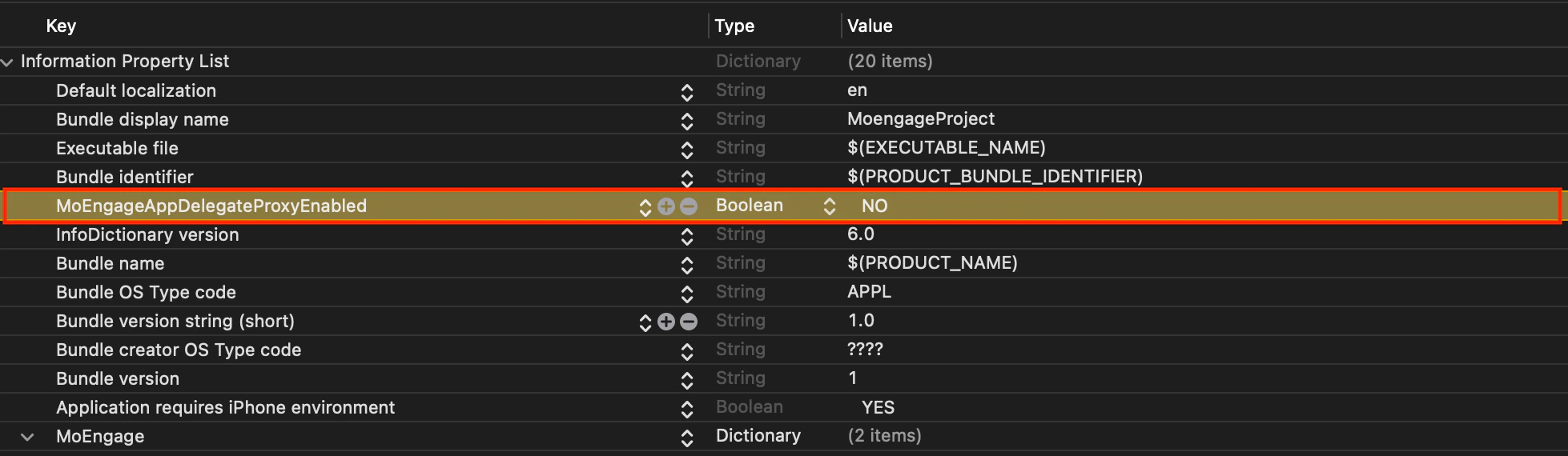
  4. Disable MoEngage Proxy:
    • Add MoEngageAppDelegateProxyEnabled key in info.plist with the value Boolean = False/NO boolean.png
  5. Pass Push Notification Token Manually:
    • Use the didRegisterForRemoteNotificationsWithDeviceToken function of AppDelegate.swift to pass the push notification token manually.
      Swift
      func application(_ application: UIApplication, didRegisterForRemoteNotificationsWithDeviceToken deviceToken: Data) {
        //7.xx version
        MoEngage.sharedInstance().setPushToken(deviceToken)
        //8.xx version
        MOMessaging.sharedInstance.setPushToken(deviceToken)
        //9.xx version
        MoEngageSDKMessaging.sharedInstance.setPushToken(deviceToken)
      }
      
  6. Implement UNUserNotificatoinCenter Delegate Functions:
    • Ensure UNUserNotificatoinCenter Delegate functions are implemented in AppDelegate.swift.
      Swift
      func userNotificationCenter(_ center: UNUserNotificationCenter, willPresent notification: UNNotification, withCompletionHandler completionHandler: @escaping (UNNotificationPresentationOptions) - Void) {
        //This is to only to display Alert and enable notification sound
        if #available(iOS 14.0, *) {
          completionHandler([.sound,.alert, .banner, .list])
        } else {
          completionHandler([.sound,.alert])
        }
      }
      func userNotificationCenter(_ center: UNUserNotificationCenter, didReceive response: UNNotificationResponse, withCompletionHandler completionHandler: @escaping () - Void) {
        //7.xx version
        MoEngage.sharedInstance().userNotificationCenter(center, didReceive: response)
        
        //8.xx version
        MOMessaging.sharedInstance.userNotificationCenter(center, didReceive: response)
        
        //9.xx version
        MoEngageSDKMessaging.sharedInstance.userNotificationCenter(center, didReceive: response)
      }